Context
Runbook to push foundation dimensions and historical facts from RI (Retail Insights, RADM01) to AIF Apps (RASE01) using the RSE_MASTER_ADHOC_PROCESS standalone job in POM. It is part of AIF Initial Setup process and runs after the RI side is validated (calendar, dimensions, historical facts).
RSE_MASTER_ADHOC_PROCESS is one job that takes a string of one-character flags — each flag toggles a load step, and flags can be combined (-pldg, -xwa). Steps that extract historical data also accept --from:YYYYMMDD --to:YYYYMMDD. See Rejected records cleanup and AIF Data warehouse Cleanup before running anything — the push only reflects what is already in RI, so unresolved rejects and duplicates land in AIF Apps as-is.
Quick access
- Open the job in POM — do this once, first.
- RSE_MASTER_ADHOC_PROCESS flags — reference of the flags used in this runbook.
- Push the foundation dimensions — first-time load of Product, Location, Calendar, Customer Segment.
- Push the historical facts — Sales, Receipts, Inventory, Price and Cost, plus
-V,-Band-PJfor LPO.- Monitor the run —
RSE_LOG_MSG.- Date validation errors — how to handle
TO date appears too far in the future.
Open the job in POM
Every step below runs the same job — open it once, then edit its parameters and rerun it for each step.
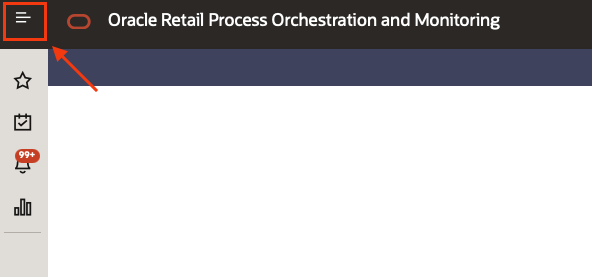
- In POM, click on the top left menu.
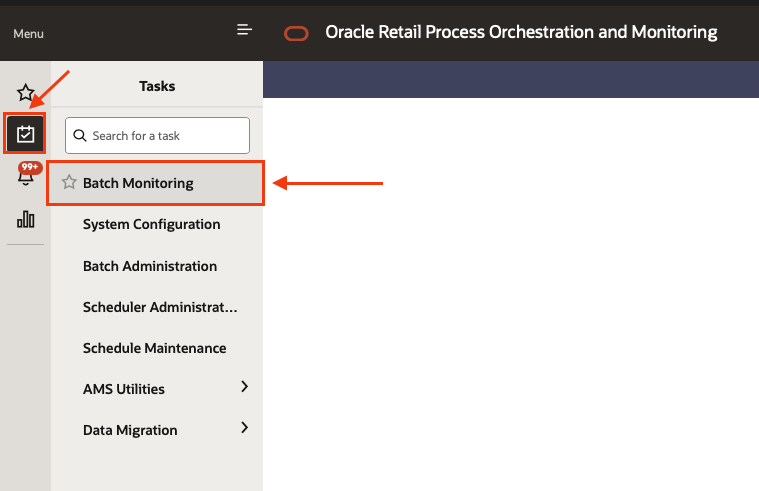
- Select the sub menu Tasks and then Batch monitoring.
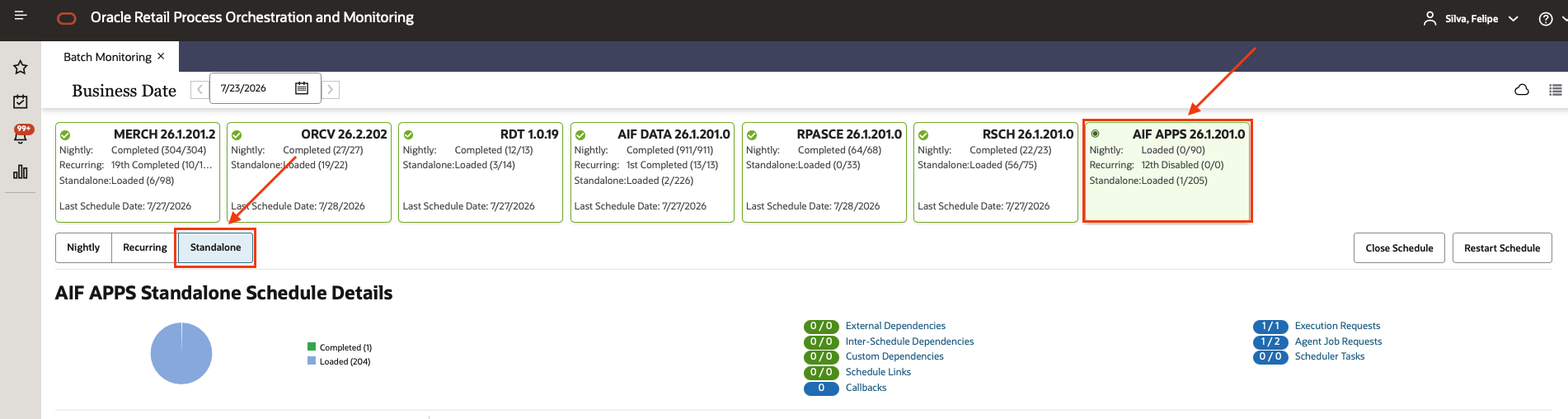
- Select the AIF APPS scheduler, and then the Standalone chain.
- Using the filter box at the top of the Standalone list, type
RSE_MASTER_ADHOC_PROCESSand click on the matching process once it appears. Do not click the “play” button yet.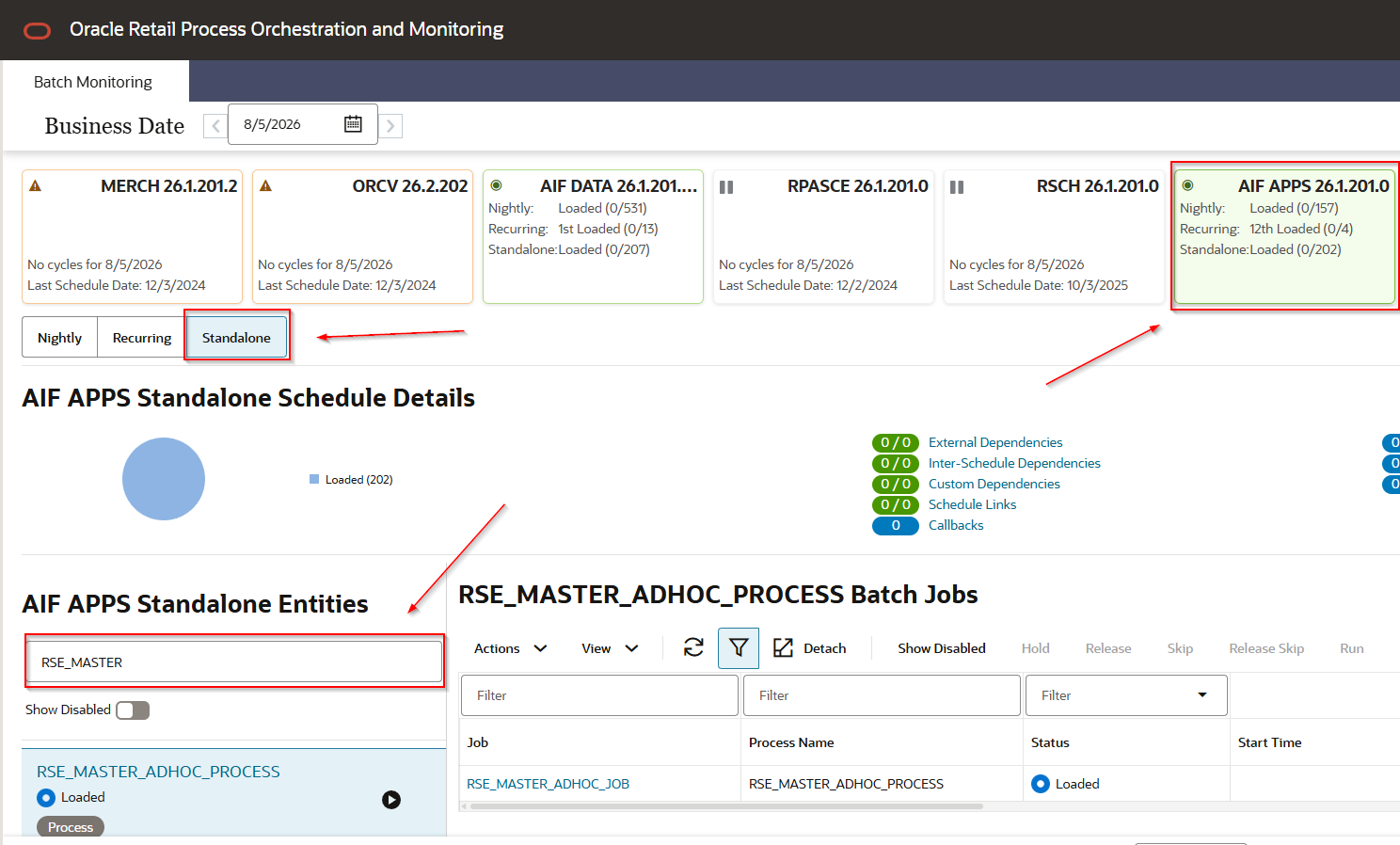
- Select the job under the process,
RSE_MASTER_ADHOC_JOB.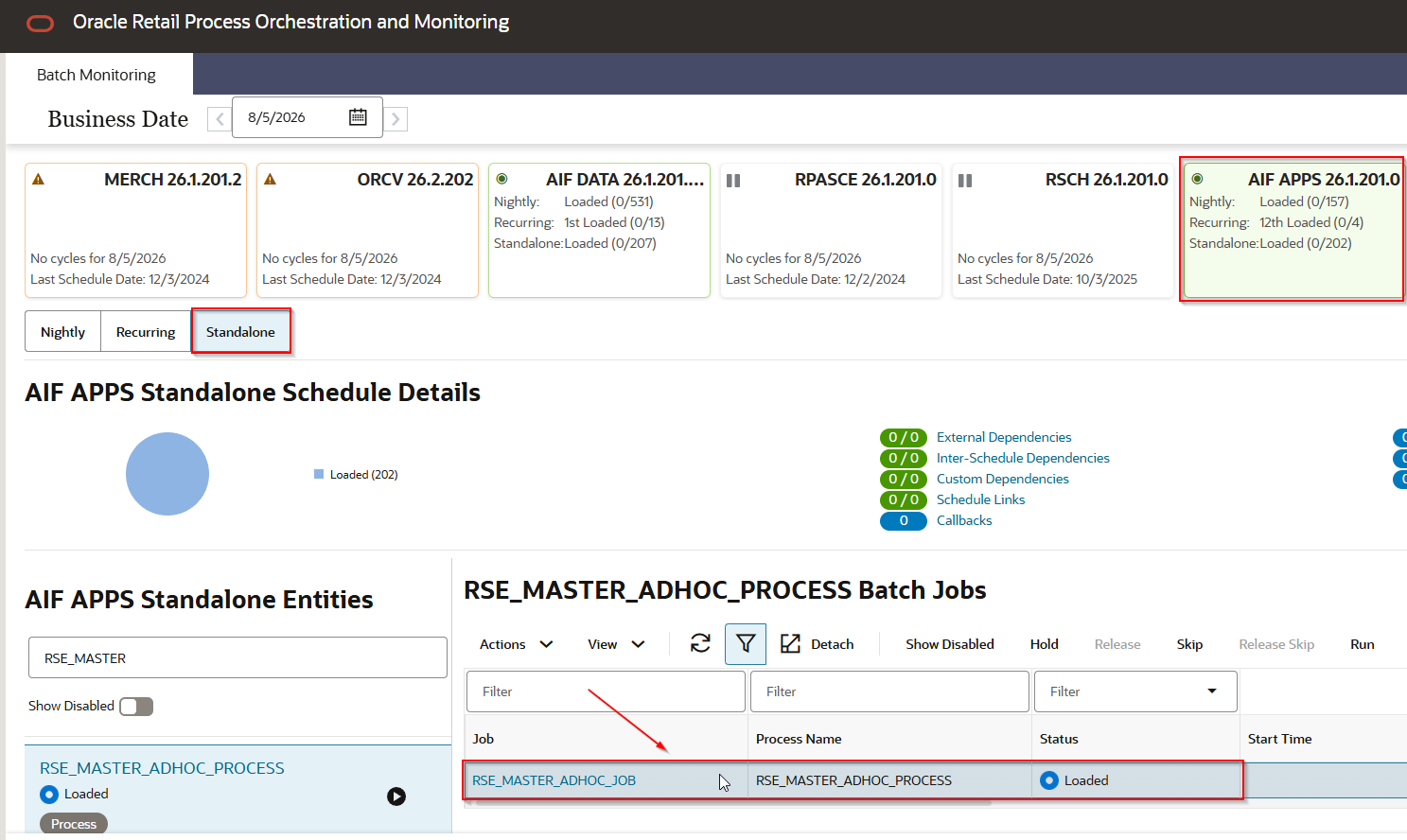
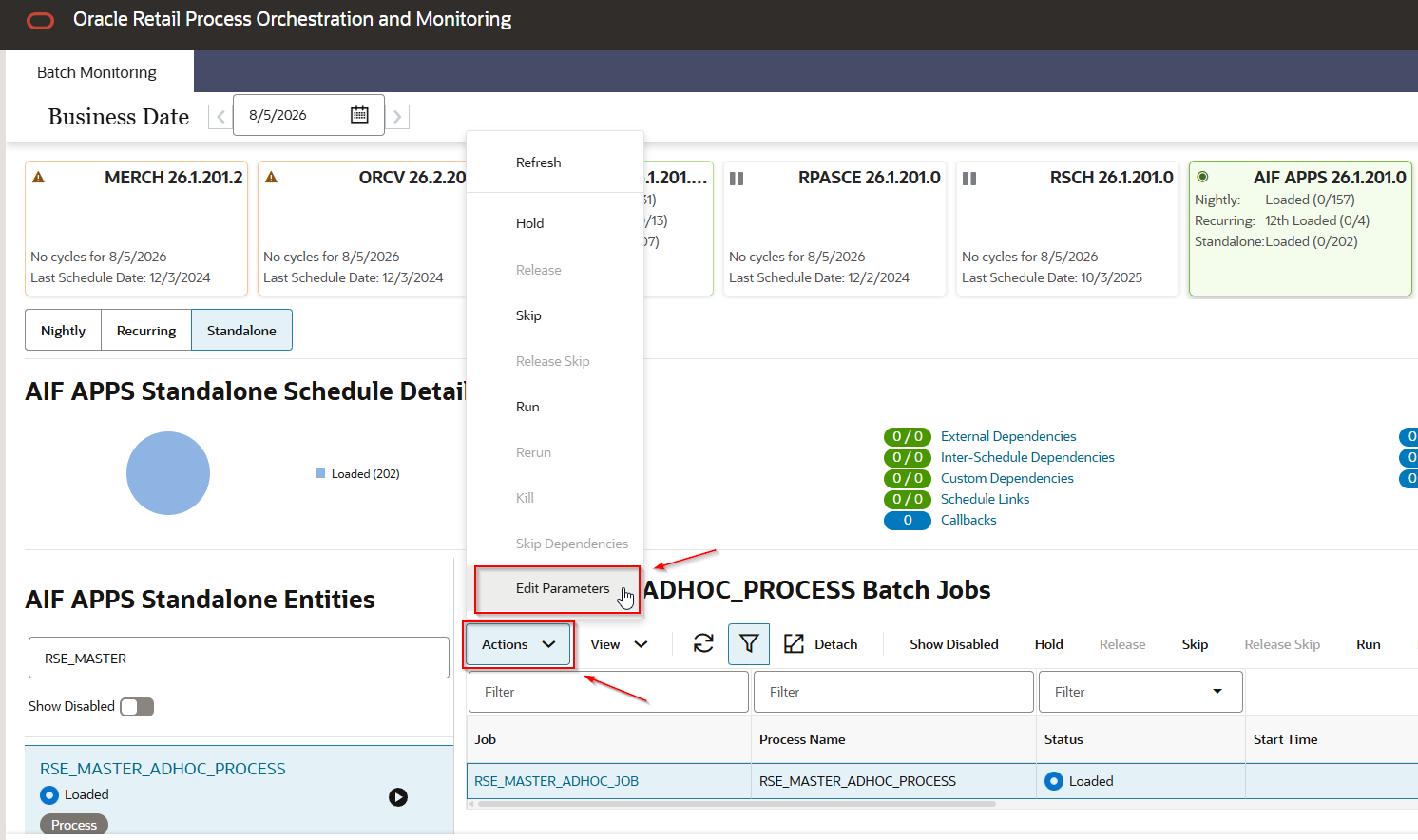
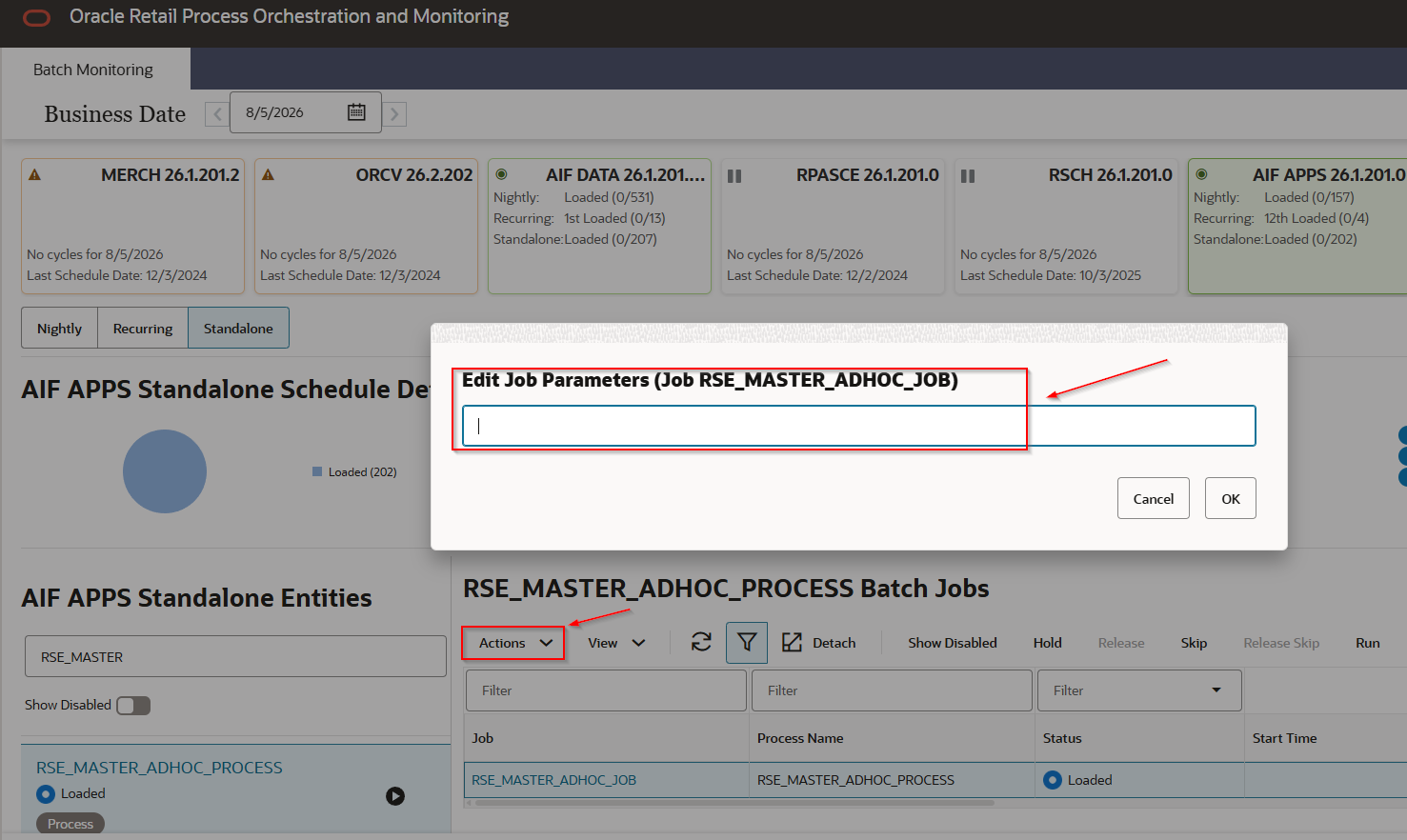
- Click Actions and then Edit Parameters, paste the parameter string for the step you are on, and save with OK.
- Click Run, then refresh until the status reaches Complete. Click the status to open the log — the
EXT_PROG_SYS_OUTlines are where the process prints its own messages.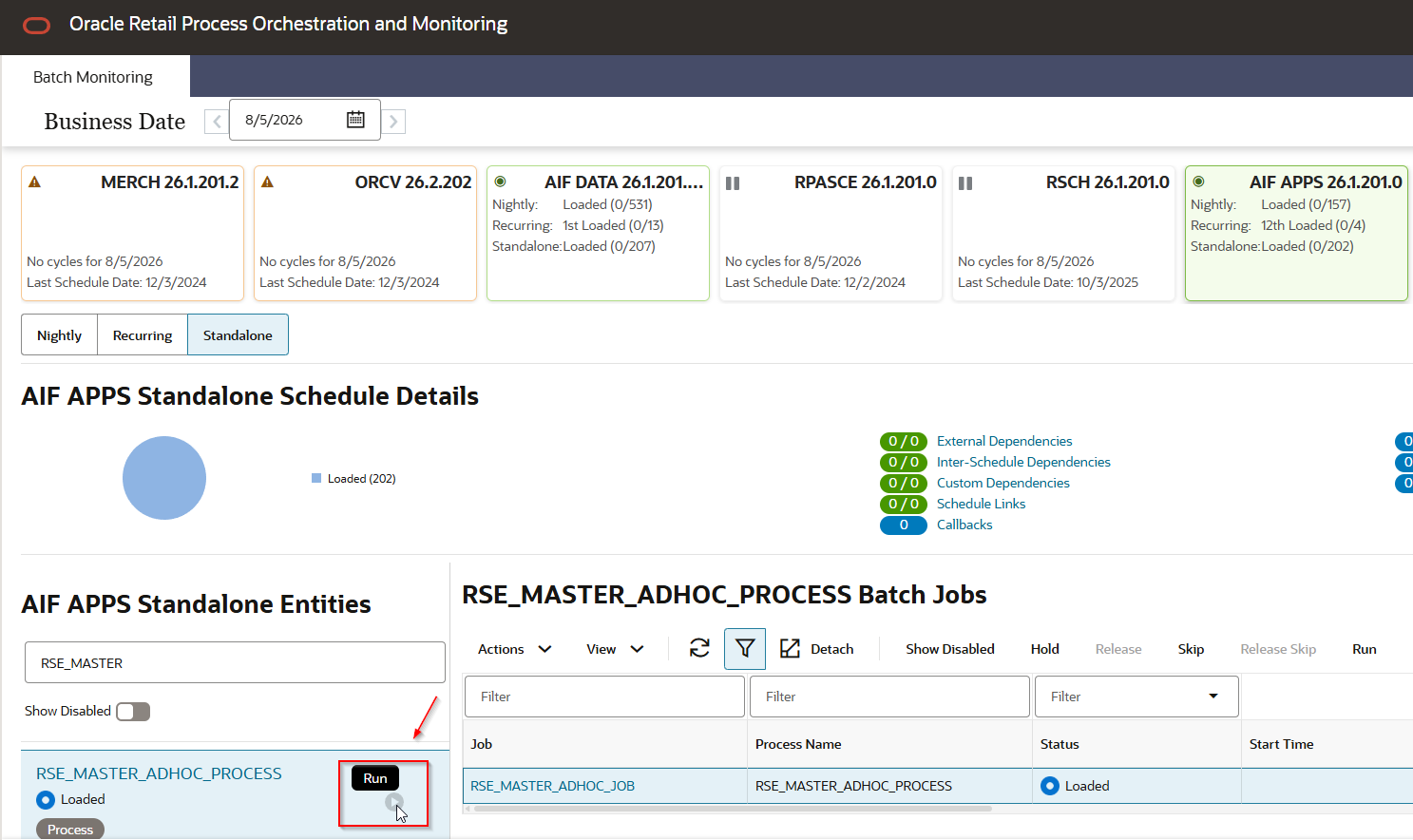
RSE_MASTER_ADHOC_PROCESS flags
Flags used in this runbook (full list: Reference).
| Flag | Step |
|---|---|
-p | Product Hierarchy |
-l | Location Hierarchy |
-d | Calendar Hierarchy |
-g | Customer Segment Hierarchy |
-z | Price Zone ETL (only when Price Zones are used) |
-N | Season Phase Item Load (required for LPO) |
-x | Sales transaction data |
-w | Weekly Aggregate Sales |
-a | Aggregate Sales processing |
-T | Weekly Return transactions |
-e | Weekly Return Aggregation |
-i | Inventory |
-C | Price and Cost |
-B | Baseline Sales and Sku/Store Ranging Calculations |
-V | Forecast Lifecycle Classification |
-P | Product Attributes |
-J | Rules Engine data for PRO (LPO) |
-L | Location attributes |
-G | Customer Segment attributes |
-m | Customer Engagement attribute |
-u | UDA load |
-H | Buyer, Allocation, Purchase Order, Transfer loads |
-O | Order Cost |
-U | Supplier, Supplier Item, Daily Supplier Cost, Supplier Inv Mgmt |
-s | Consumer segment data |
The order and grouping used at P&C (hierarchies → attributes → orders → supplier → facts) is recorded in Push information from Retail Insights to AIF APPS.
Date parameters for the historical steps: --from:YYYYMMDD, --to:YYYYMMDD, --extfrom:Y and --extto:Y to extend to week start/end.
Push the foundation dimensions
- Choose the parameter bundle for your scope:
-pldg— core hierarchies (Oracle’s documented first-time bundle).-pldgz— core + Price Zone.-pldgNz— core + Price Zone + Season/Phase (typical LPO setup).
- Run
RSE_MASTER_ADHOC_PROCESSwith the bundle chosen above. - Validate the load in AIF Apps: Validate AIF Apps dimensions.
Extended product hierarchy
If the implementation uses the 9-level product hierarchy (style / style-color, used by AP, IPO, LPO), confirm
LOAD_EXTENDED_PROD_HIER = YandPROD_HIER_SLSTXN_HIER_LEVEL_IDinRSE_CONFIG(in APEX, orAI FOUNDATION CLOUD SERVICE>TOP LEFT MENU>Tasks>Control and Tactical Center>Manage Configurations) before running the push. A mismatch produces anExtended Hierarchy Level mismatcherror on the fact push, not here.
Push the historical facts
Only after Validate AIF Apps dimensions is clean. Push and validate one interface at a time — a bad range on Sales compounds into Receipts and Inventory if you do not catch it first.
Use --from/--to matching the min/max dates loaded into RI for each interface. Get them by querying the date range on the RI fact table of that interface:
select
	TO_CHAR(min(<date_column>), 'YYYYMMDD') AS min_dt,
	TO_CHAR(max(<date_column>), 'YYYYMMDD') AS max_dt
from <RI_fact_table>;
RI fact table and date column per interface:
| Interface | RI fact table | Date column |
|---|---|---|
| Sales | W_RTL_SLS_TRX_IT_LC_DY_F | DT_WID |
| Receipts | W_RTL_INVRC_IT_LC_DY_F | DT_WID |
| Inventory | W_RTL_INV_IT_LC_DY_F | DT_WID |
| Price | W_RTL_PRICE_IT_LC_DY_F | FROM_DT_WID |
For Sales example, if RI runs from 2024-01-01 to 2026-03-22:
RSE_MASTER_ADHOC_PROCESS -xwa --from:20240101 --to:20260322
- Sales —
RSE_MASTER_ADHOC_PROCESS -xwa --from:<FROM> --to:<TO>. If it fails withTO date appears too far in the future, see Date validation errors. Validate: Sales. - Receipts (when applicable, before Inventory) —
RSE_MASTER_ADHOC_PROCESS -Te --from:<FROM>. Validate: Receipts. - Inventory —
RSE_MASTER_ADHOC_PROCESS -i --from:<FROM>. Validate: Inventory. - Price and Cost —
RSE_MASTER_ADHOC_PROCESS -C --from:<FROM>. Validate: Price. - Additional groups for LPO —
RSE_MASTER_ADHOC_PROCESS -V(Forecast Lifecycle Classification), thenRSE_MASTER_ADHOC_PROCESS -B(Baseline Sales and Sku/Store Ranging), thenRSE_MASTER_ADHOC_PROCESS -PJ(Product Attributes + LPO Rules Engine). All three are prerequisites forPRO_MASTER_ADHOC_PROCESSin Build the LPO application —-Bin particular feeds its-bBaseline step. Confirm the three jobs completed in the POM log.
Monitor the run
Besides the POM log, each step writes to RSE_LOG_MSG in the AIF Apps schema. Newest first:
select * from RSE_LOG_MSG order by MSG_TS DESC;Date validation errors
RSE_MASTER_ADHOC_PROCESS can fail with:
EXT_PROG_SYS_OUT:rse_master.ksh: TO date appears too far in the future.
Maximum available date is 20250331.
Passed parameter is 20260322.
If the --to you passed is correct and the RI data actually goes up to that date, rerun with --bypass_date_validation:Y:
RSE_MASTER_ADHOC_PROCESS -xwa --from:<FROM> --to:<TO> --bypass_date_validation:Y
--bypass_date_validation:Yis not in the Oracle docsWorkaround seen in practice on the Sales push. It only skips the process date check — it does not create missing data. Do not use it to mask a wrong
--toor an incomplete RI load.
Related
- AIF Initial Setup process
- Push information from Retail Insights to AIF APPS
- How to run a POM standalone job
- Validate AIF Apps dimensions
- Validate AIF Apps historical facts
- Build the LPO application
- Rejected records cleanup
- AIF Data warehouse Cleanup