Context
Runbook to delete rejected rows from the E$ error tables left behind by a previous load, across the RADM01 and RABE01USER schemas. It applies to any client or implementation. It is part of Environment cleanup process.
This step deletes data
The block deletes rejected rows from every
E$table it finds and commits per table. Confirm you are connected to the correct environment before running it.
Quick access
- Cleanup using APEX — clears all
E$tables in one run; best for a full reset.- Cleanup through POM — targets specific tables and date ranges; best for surgical cleanup.
- Verify the cleanup — row-count check to run after either method.
There are two ways to run this cleanup.
Cleanup using APEX
Clears every E$ table across both schemas (RADM01, RABE01USER) in a single run. Execute:
SET SERVEROUTPUT ON SIZE UNLIMITED

ALTER SESSION ENABLE PARALLEL DML;

DECLARE
    v_sql      VARCHAR2(4000);
    v_rows_del PLS_INTEGER;
    v_has_col  PLS_INTEGER;
BEGIN
    FOR rec IN (
        SELECT owner, table_name
        FROM all_tables
        WHERE table_name LIKE '%E$%'
          AND owner IN ('RADM01', 'RABE01USER')
        ORDER BY table_name ASC
    ) LOOP
        SELECT COUNT(*) INTO v_has_col
        FROM all_tab_columns
        WHERE owner = rec.owner
          AND table_name = rec.table_name
          AND column_name = 'ERR_TYPE';

        IF v_has_col = 0 THEN
            DBMS_OUTPUT.PUT_LINE(rec.owner || '.' || rec.table_name || ' -> SKIPPED (no ERR_TYPE column)');
        ELSE
            BEGIN
                v_sql := 'DELETE /*+ PARALLEL(8) */ FROM ' || rec.owner || '.' || rec.table_name ||
                         ' WHERE err_type != ''0''';
                EXECUTE IMMEDIATE v_sql;
                v_rows_del := SQL%ROWCOUNT;
                COMMIT;
                DBMS_OUTPUT.PUT_LINE(rec.owner || '.' || rec.table_name || ' -> DELETED ' || v_rows_del || ' rows');
            EXCEPTION
                WHEN OTHERS THEN
                    ROLLBACK;
                    DBMS_OUTPUT.PUT_LINE(rec.owner || '.' || rec.table_name || ' -> ERROR: ' || SQLERRM);
            END;
        END IF;
    END LOOP;
END;
Cleanup through POM
Best for targeted cleanup of specific tables and date ranges.
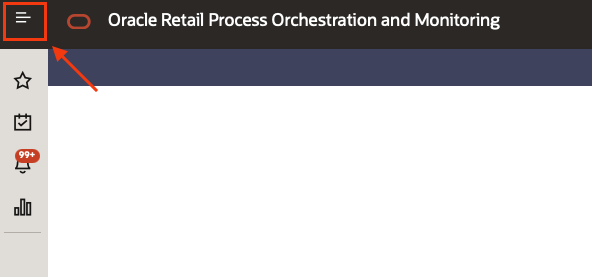
- Accessing POM click on the top left menu
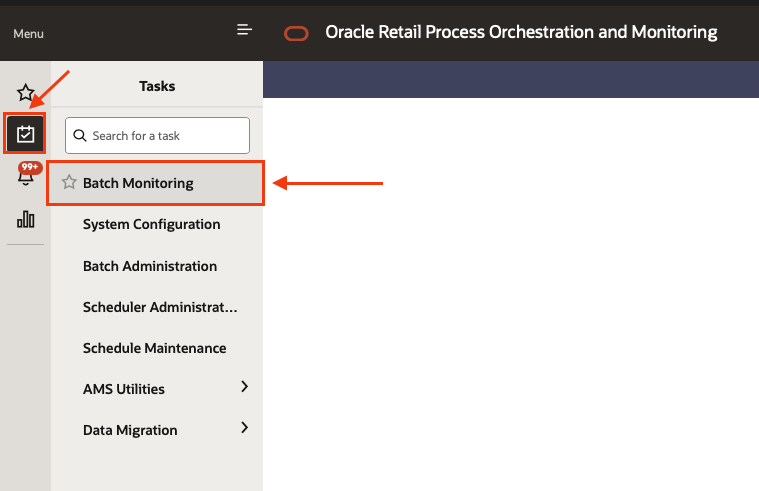
- Select the sub menu “Tasks” and then “Batch monitoring”
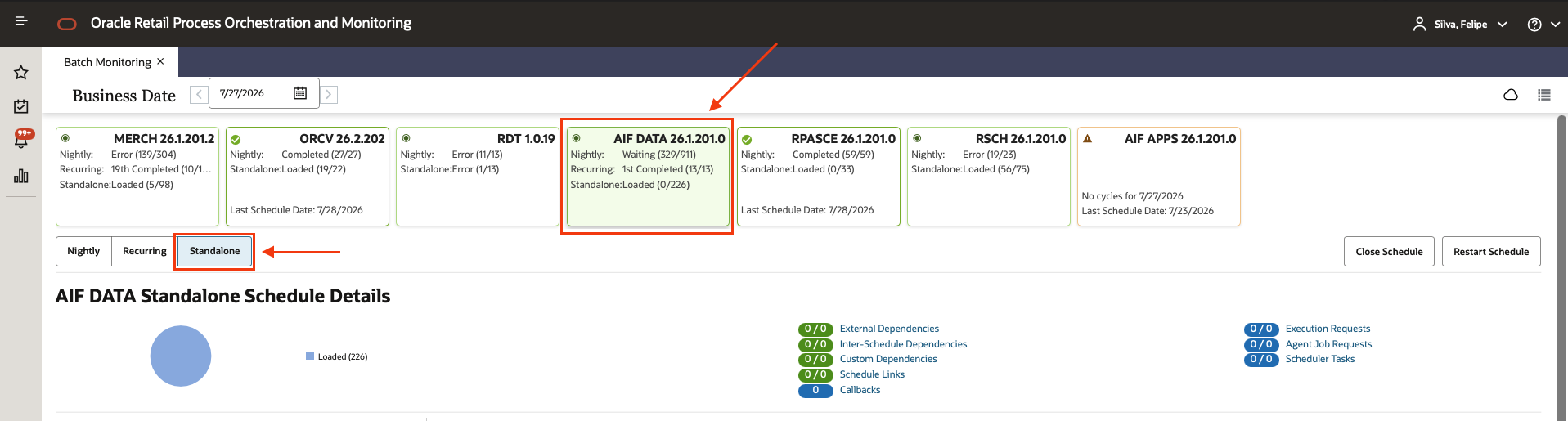
- Select the AIF DATA scheduler, and the Standalone chain
- Using the filters type W_CLEANUP_E_DATA_ADHOC and select the process once it appears (Do not click the “play” button yet.)
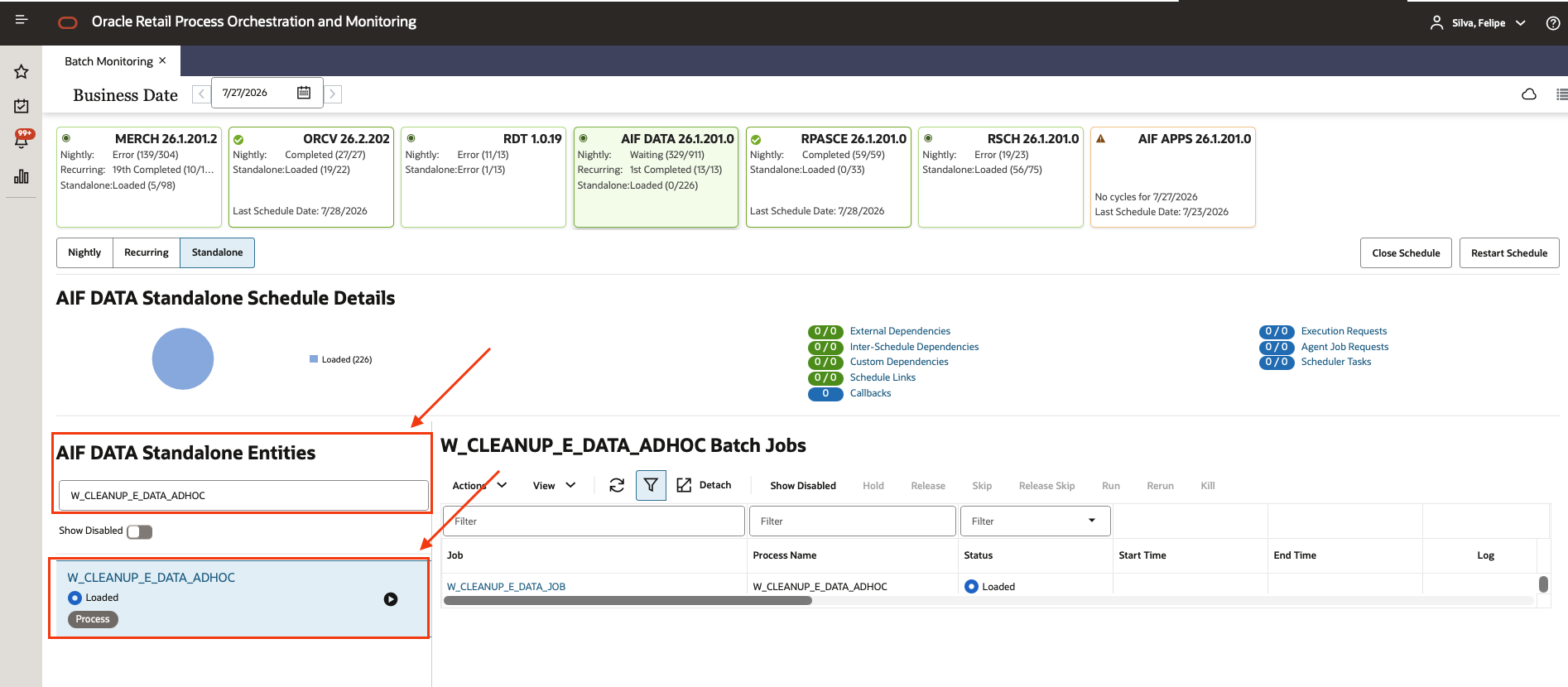
- Select the only job in this process called W_CLEANUP_E_DATA_JOB

- Click in “Actions” and then “Edit Parameters”
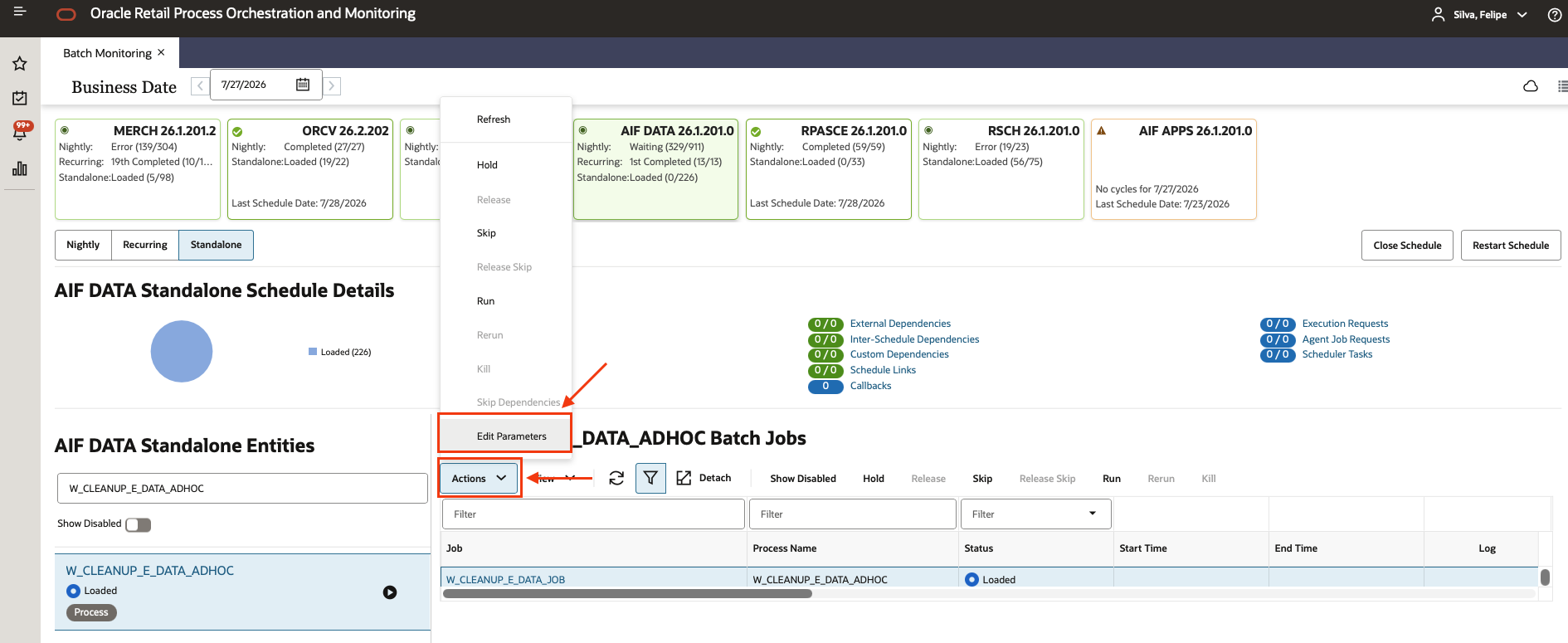
- On the “Edit ” screen you will need to fill the parameters as below:
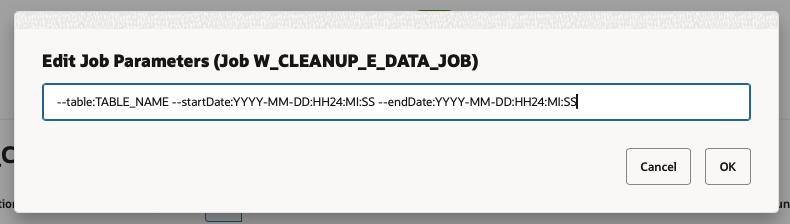
The parameter string uses the following format:
--table:TABLE_NAME --startDate:YYYYMMDD-HH24MISS --endDate:YYYYMMDD-HH24MISS
All of the following alternate formats are also accepted:
--table:E$_W_RTL_MKTSLS_TA_CH_HG_WK_TM
--table:E$_W_RTL_TSF_IT_LC_DY_TMP --startDate:2025-12-08 --endDate:2025-12-08
--table:E$_W_RTL_PLAN3_PROD3_LC3_T3_TM --startDate:2025-12-08:00:00:00 --endDate:2025-12-08:23:59:59
--table:E$_W_RTL_PLAN3_PROD3_LC3_T3_TM --startDate:20251205-000000 --endDate:20251205-235959
--table:E$_W_RTL_PLAN3_PROD3_LC3_T3_TM --startDate:20251118 --endDate:20251118
--table:E$_W_RTL_PLAN3_PROD3_LC3_T3_TM --startDate:20251202000000 --endDate:20251202235959
--table:E$_W_RTL_PLAN3_PROD3_LC3_T3_TM --startDate:2025-12-15;00:00:00 --endDate:2025-12-15;23:59:59
Verify the cleanup
Run after either method to confirm the E$ tables are empty:
SELECT t.table_name,
       TO_NUMBER(
           EXTRACTVALUE(
               XMLTYPE(
                   DBMS_XMLGEN.GETXML('SELECT COUNT(*) AS c FROM ' || t.owner || '.' || t.table_name)
               ),
               '/ROWSET/ROW/C'
           )
       ) AS row_count
FROM all_tables t
WHERE t.table_name LIKE '%E$%'
  AND t.owner IN ('RADM01', 'RABE01USER')
ORDER BY row_count DESC NULLS LAST;