Context
Incremental mode is the standard steady state for the AIF_DATA batch: each nightly run extracts from MFCS only the delta since the previous run, instead of a full positional snapshot.
Use this procedure to return the environment to incremental after a full-mode run. Full mode is meant to be used for a single nightly batch, to re-sync the data warehouse, and the environment must be put back to incremental afterwards, otherwise every subsequent nightly batch extracts a complete snapshot and run times degrade badly.
This note is the exact counterpart of Batch setup - Full mode: the same 13 parameters, set back to their opposite values.
Values are inverted between the two modes
IS_INCREMENTALis set toYhere (it isNin full mode), whileINV_FULL_LOAD_INDandPO_FULL_LOAD_INDare set toN(they areYin full mode). Both spellings mean the same thing: “run the delta, not the snapshot”.
Configuration
Parameters configuration
Connect through APEX, or navigate AI FOUNDATION CLOUD SERVICE > TOP LEFT MENU > Tasks > Control and Tactical Center > Manage Configurations > select the table C_ODI_PARAM and update the following parameters:
1 - ITEM DIMENSION (SIL)
update c_odi_param p
set
	p.CHANGE_ON_DT = sysdate,
	p.param_value = 'Y'
where
	p.SCENARIO_NAME = 'SIL_ITEMDIMENSION'
	and p.PARAM_NAME = 'IS_INCREMENTAL';
2 - ITEM CFA (SIL)
update c_odi_param p
set
	p.CHANGE_ON_DT = sysdate,
	p.param_value = 'Y'
where
	p.SCENARIO_NAME = 'SIL_RETAILITEMCFADIMENSION'
	and p.PARAM_NAME = 'IS_INCREMENTAL';
3 - ITEM/LOC CFA (SIL)
update c_odi_param p
set
	p.CHANGE_ON_DT = sysdate,
	p.param_value = 'Y'
where
	p.SCENARIO_NAME = 'SIL_RETAILITEMLOCCFADIMENSION'
	and p.PARAM_NAME = 'IS_INCREMENTAL';
4 - LOCATION CFA (SIL)
update c_odi_param p
set
	p.CHANGE_ON_DT = sysdate,
	p.param_value = 'Y'
where
	p.SCENARIO_NAME = 'SIL_RETAILLOCATIONCFADIMENSION'
	and p.PARAM_NAME = 'IS_INCREMENTAL';
5 - ITEM DIMENSION (SDE)
update c_odi_param p
set
	p.CHANGE_ON_DT = sysdate,
	p.param_value = 'Y'
where
	p.SCENARIO_NAME = 'SDE_RETAILITEMDIMENSION'
	and p.PARAM_NAME = 'IS_INCREMENTAL';
6 - ITEM/LOC RANGE (SDE)
update c_odi_param p
set
	p.CHANGE_ON_DT = sysdate,
	p.param_value = 'Y'
where
	p.SCENARIO_NAME = 'SDE_RETAILITEMLOCATIONRANGEDIMENSION'
	and p.PARAM_NAME = 'IS_INCREMENTAL';
7 - ITEM/SUPPLIER (SDE)
update c_odi_param p
set
	p.CHANGE_ON_DT = sysdate,
	p.param_value = 'Y'
where
	p.SCENARIO_NAME = 'SDE_RETAILITEMSUPPLIERDIMENSION'
	and p.PARAM_NAME = 'IS_INCREMENTAL';
8 - ITEM/LOCATION (SDE)
update c_odi_param p
set
	p.CHANGE_ON_DT = sysdate,
	p.param_value = 'Y'
where
	p.SCENARIO_NAME = 'SDE_RETAILITEMLOCATIONDIMENSION'
	and p.PARAM_NAME = 'IS_INCREMENTAL';
9 - ITEM/LOC CFA (SDE)
update c_odi_param p
set
	p.CHANGE_ON_DT = sysdate,
	p.param_value = 'Y'
where
	p.SCENARIO_NAME = 'SDE_RETAILITEMLOCCFADIMENSION'
	and p.PARAM_NAME = 'IS_INCREMENTAL';
10 - LOCATION CFA (SDE)
update c_odi_param p
set
	p.CHANGE_ON_DT = sysdate,
	p.param_value = 'Y'
where
	p.SCENARIO_NAME = 'SDE_RETAILLOCATIONCFADIMENSION'
	and p.PARAM_NAME = 'IS_INCREMENTAL';
11 - ITEM CFA (SDE)
update c_odi_param p
set
	p.CHANGE_ON_DT = sysdate,
	p.param_value = 'Y'
where
	p.SCENARIO_NAME = 'SDE_RETAILITEMCFADIMENSION'
	and p.PARAM_NAME = 'IS_INCREMENTAL';
12 - INVENTORY POSITION (SIL)
update c_odi_param p
set
	p.CHANGE_ON_DT = sysdate,
	p.param_value = 'N'
where
	p.SCENARIO_NAME = 'SIL_RETAILINVPOSITIONFACT'
	and p.PARAM_NAME = 'INV_FULL_LOAD_IND';
13 - PO ON ORDER (SIL)
update c_odi_param p
set
	p.CHANGE_ON_DT = sysdate,
	p.param_value = 'N'
where
	p.SCENARIO_NAME = 'SIL_RETAILPOONORDERFACT'
	and p.PARAM_NAME = 'PO_FULL_LOAD_IND';
POM
System options
This step reverts the Retail Data Extractor (RDE) change made in full mode, so the extractor goes back to the standard incremental delta instead of a full snapshot.
-
Accessing POM click on the top left menu
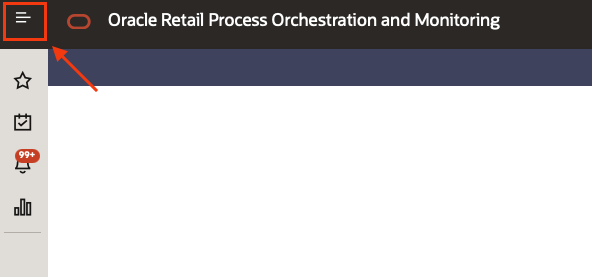
-
Select the sub menu “Tasks” and then “System Configurations”
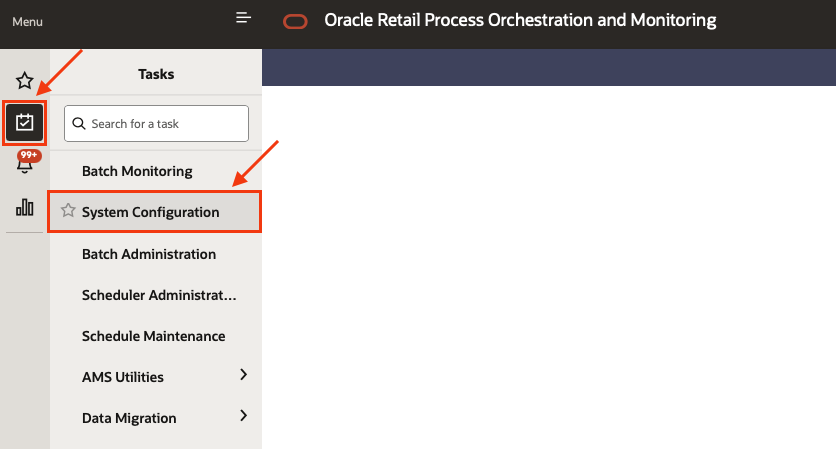
-
Click on “Schedules”, locate the AIF DATA configurations and click on “System Options”
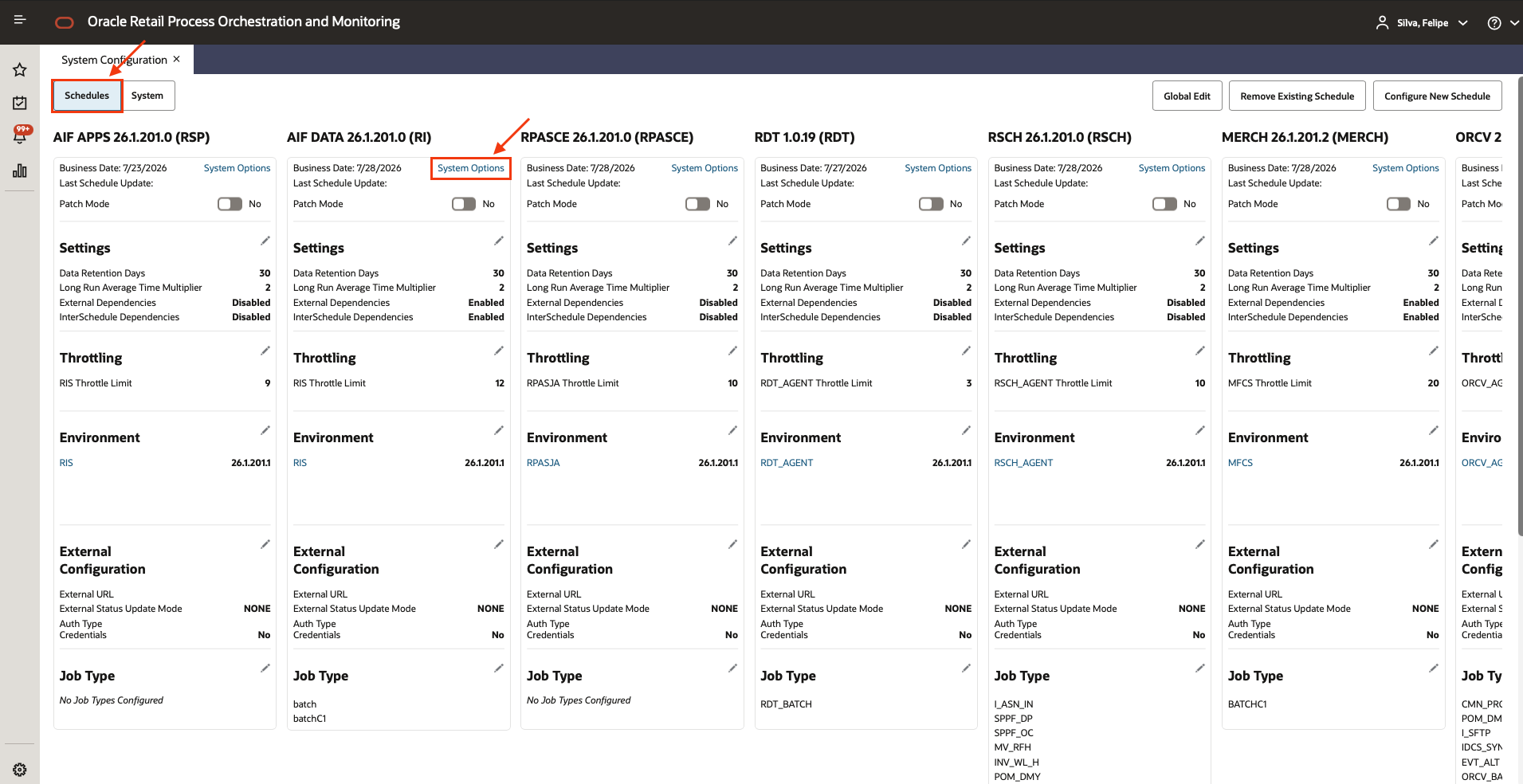
-
Locate the “keys” called
RDE_RunFactODIVersionandRDE_RunFactVersion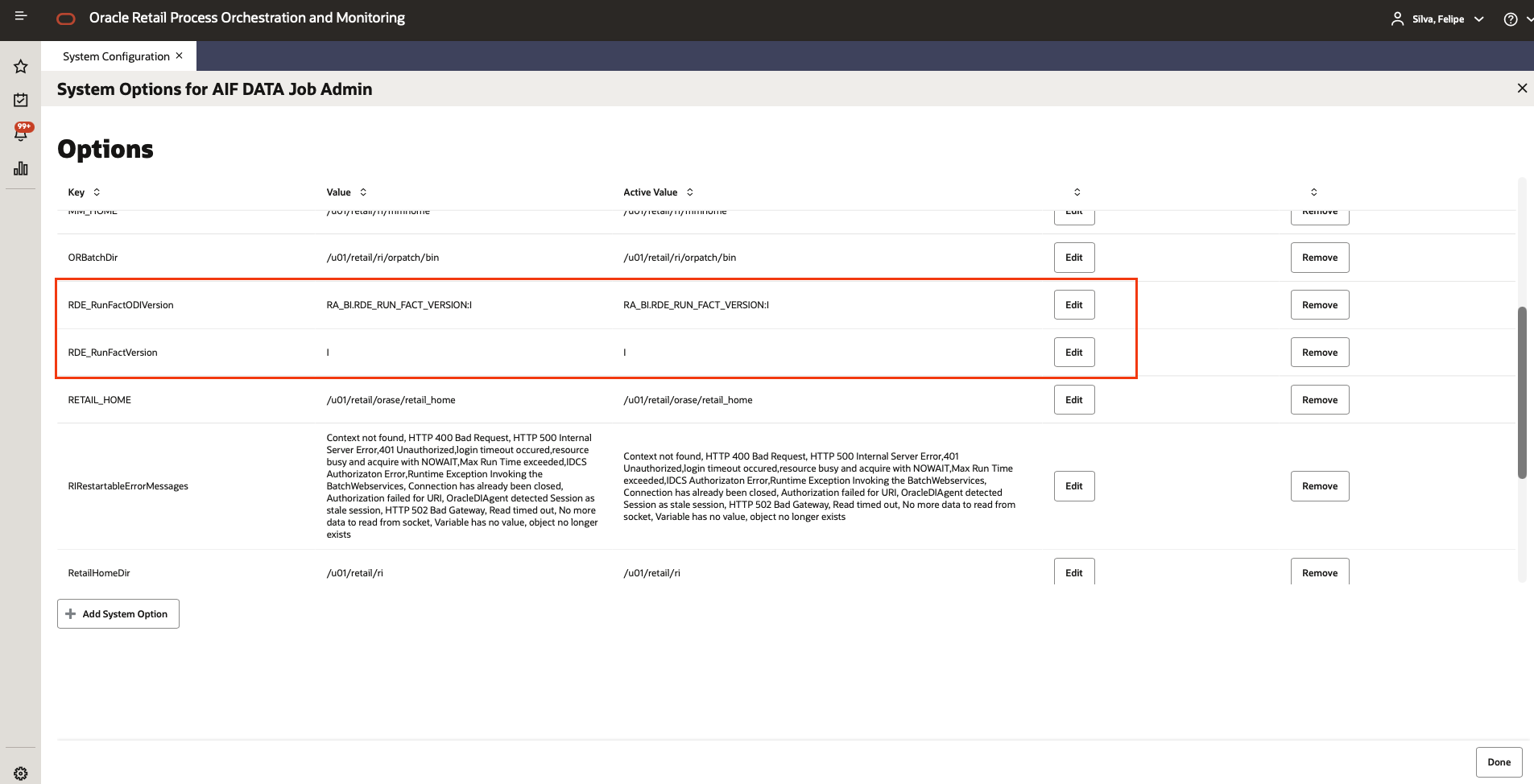
Edit:
RDE_RunFactODIVersion > Active value = RA_BI.RDE_RUN_FACT_VERSION:I
RDE_RunFactVersion > Active value = I
Nightly batch
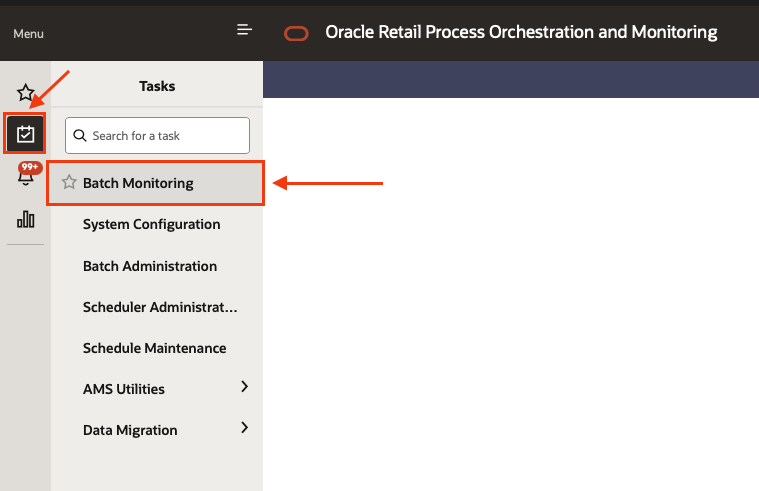
- Accessing POM click on the top left menu
- Select the sub menu “Tasks” and then “Batch monitoring”
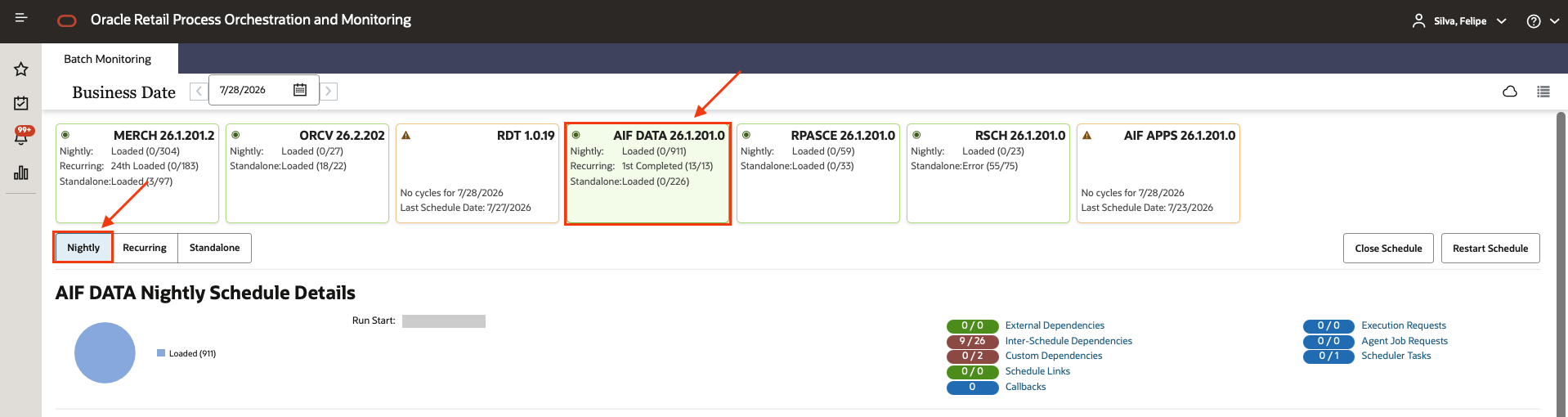
- Select the AIF DATA scheduler, and the Nightly chain
- Using the filters find and select the job
RDE_EXTRACT_END_MILEMARKER_JOBand remove the hold on it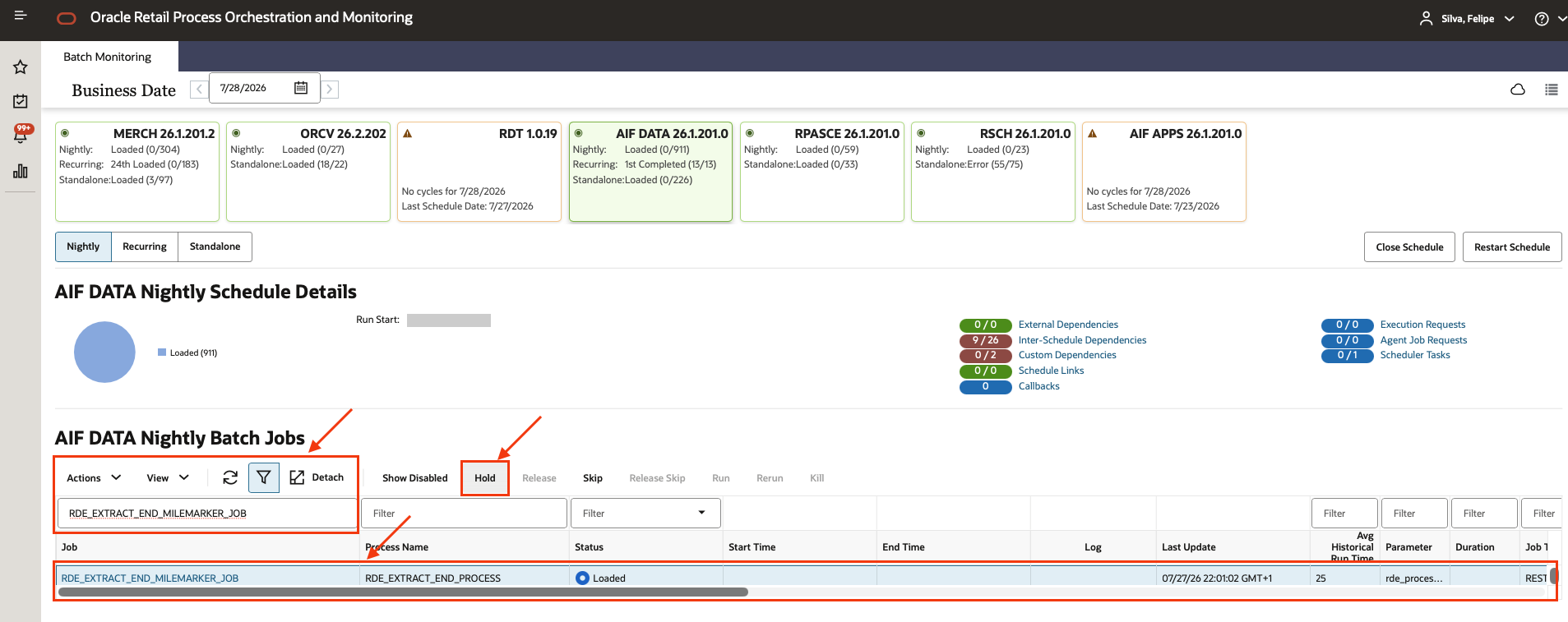
Full mode places a hold on this job so the extraction can be validated mid-chain. In incremental mode the chain must run end to end without interruption, so release the hold if it is still in place.
The next nightly batch will then run as a normal incremental extraction.
Related
- Batch setup - Full mode: the counterpart procedure, to run beforehand
- MFCS Extraction validations: validation samples
- AIF Initial Setup process