Context
We use batch setup in full mode on AIF_DATA in order to extract from MFCS the latest positional state for all entities. Instead of the standard incremental delta, each configured entity is extracted as a complete snapshot.
Full mode is an exception, not the steady state. It is meant to run for a single nightly batch, to re-sync the data warehouse, after which the environment must be put back to incremental. If it is left in place, every subsequent nightly batch extracts a complete snapshot and run times degrade badly.
This note is the exact counterpart of Batch setup - Incremental mode: the same 13 parameters, set to their opposite values. Run that procedure once the full extraction has completed and been validated.
Values are inverted between the two modes
IS_INCREMENTALis set toNhere (it isYin incremental mode), whileINV_FULL_LOAD_INDandPO_FULL_LOAD_INDare set toY(they areNin incremental mode). Both spellings mean the same thing: “run the full snapshot, not the delta”.
Configuration
Parameters configuration
Connect through APEX, or navigate AI FOUNDATION CLOUD SERVICE > TOP LEFT MENU > Tasks > Control and Tactical Center > Manage Configurations > select the table C_ODI_PARAM and update the following parameters:
1 - ITEM DIMENSION (SIL)
update c_odi_param p
set
	p.CHANGE_ON_DT = sysdate,
	p.param_value = 'N'
where
	p.SCENARIO_NAME = 'SIL_ITEMDIMENSION'
	and p.PARAM_NAME = 'IS_INCREMENTAL';
2 - ITEM CFA (SIL)
update c_odi_param p
set
	p.CHANGE_ON_DT = sysdate,
	p.param_value = 'N'
where
	p.SCENARIO_NAME = 'SIL_RETAILITEMCFADIMENSION'
	and p.PARAM_NAME = 'IS_INCREMENTAL';
3 - ITEM/LOC CFA (SIL)
update c_odi_param p
set
	p.CHANGE_ON_DT = sysdate,
	p.param_value = 'N'
where
	p.SCENARIO_NAME = 'SIL_RETAILITEMLOCCFADIMENSION'
	and p.PARAM_NAME = 'IS_INCREMENTAL';
4 - LOCATION CFA (SIL)
update c_odi_param p
set
	p.CHANGE_ON_DT = sysdate,
	p.param_value = 'N'
where
	p.SCENARIO_NAME = 'SIL_RETAILLOCATIONCFADIMENSION'
	and p.PARAM_NAME = 'IS_INCREMENTAL';
5 - ITEM DIMENSION (SDE)
update c_odi_param p
set
	p.CHANGE_ON_DT = sysdate,
	p.param_value = 'N'
where
	p.SCENARIO_NAME = 'SDE_RETAILITEMDIMENSION'
	and p.PARAM_NAME = 'IS_INCREMENTAL';
6 - ITEM/LOC RANGE (SDE)
update c_odi_param p
set
	p.CHANGE_ON_DT = sysdate,
	p.param_value = 'N'
where
	p.SCENARIO_NAME = 'SDE_RETAILITEMLOCATIONRANGEDIMENSION'
	and p.PARAM_NAME = 'IS_INCREMENTAL';
7 - ITEM/SUPPLIER (SDE)
update c_odi_param p
set
	p.CHANGE_ON_DT = sysdate,
	p.param_value = 'N'
where
	p.SCENARIO_NAME = 'SDE_RETAILITEMSUPPLIERDIMENSION'
	and p.PARAM_NAME = 'IS_INCREMENTAL';
8 - ITEM/LOCATION (SDE)
update c_odi_param p
set
	p.CHANGE_ON_DT = sysdate,
	p.param_value = 'N'
where
	p.SCENARIO_NAME = 'SDE_RETAILITEMLOCATIONDIMENSION'
	and p.PARAM_NAME = 'IS_INCREMENTAL';
9 - ITEM/LOC CFA (SDE)
update c_odi_param p
set
	p.CHANGE_ON_DT = sysdate,
	p.param_value = 'N'
where
	p.SCENARIO_NAME = 'SDE_RETAILITEMLOCCFADIMENSION'
	and p.PARAM_NAME = 'IS_INCREMENTAL';
10 - LOCATION CFA (SDE)
update c_odi_param p
set
	p.CHANGE_ON_DT = sysdate,
	p.param_value = 'N'
where
	p.SCENARIO_NAME = 'SDE_RETAILLOCATIONCFADIMENSION'
	and p.PARAM_NAME = 'IS_INCREMENTAL';
12 - ITEM CFA (SDE)
update c_odi_param p
set
	p.CHANGE_ON_DT = sysdate,
	p.param_value = 'N'
where
	p.SCENARIO_NAME = 'SDE_RETAILITEMCFADIMENSION'
	and p.PARAM_NAME = 'IS_INCREMENTAL';
13 - INVENTORY POSITION (SIL)
update c_odi_param p
set
	p.CHANGE_ON_DT = sysdate,
	p.param_value = 'Y'
where
	p.SCENARIO_NAME = 'SIL_RETAILINVPOSITIONFACT'
	and p.PARAM_NAME = 'INV_FULL_LOAD_IND';
14 - PO ON ORDER (SIL)
update c_odi_param p
set
	p.CHANGE_ON_DT = sysdate,
	p.param_value = 'Y'
where
	p.SCENARIO_NAME = 'SIL_RETAILPOONORDERFACT'
	and p.PARAM_NAME = 'PO_FULL_LOAD_IND';
POM
System options
-
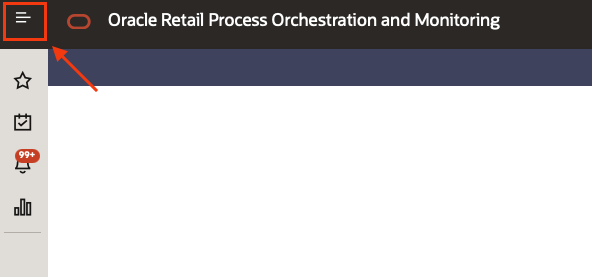
Accessing POM click on the top left menu
-
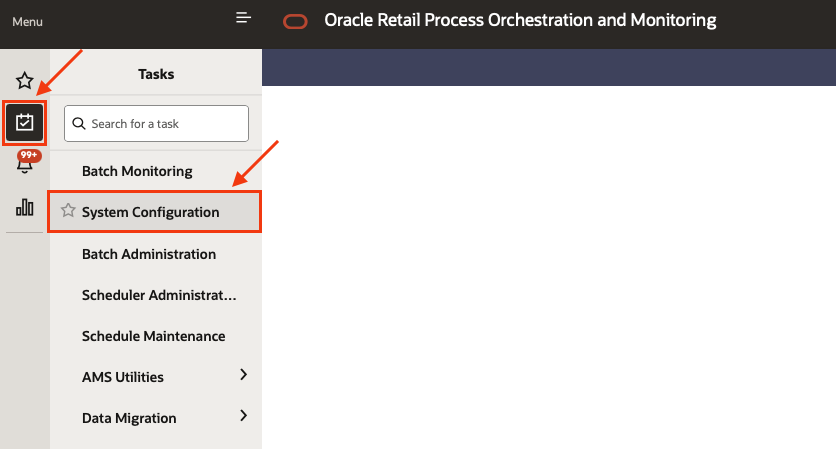
Select the sub menu “Tasks” and then “System Configurations”
-
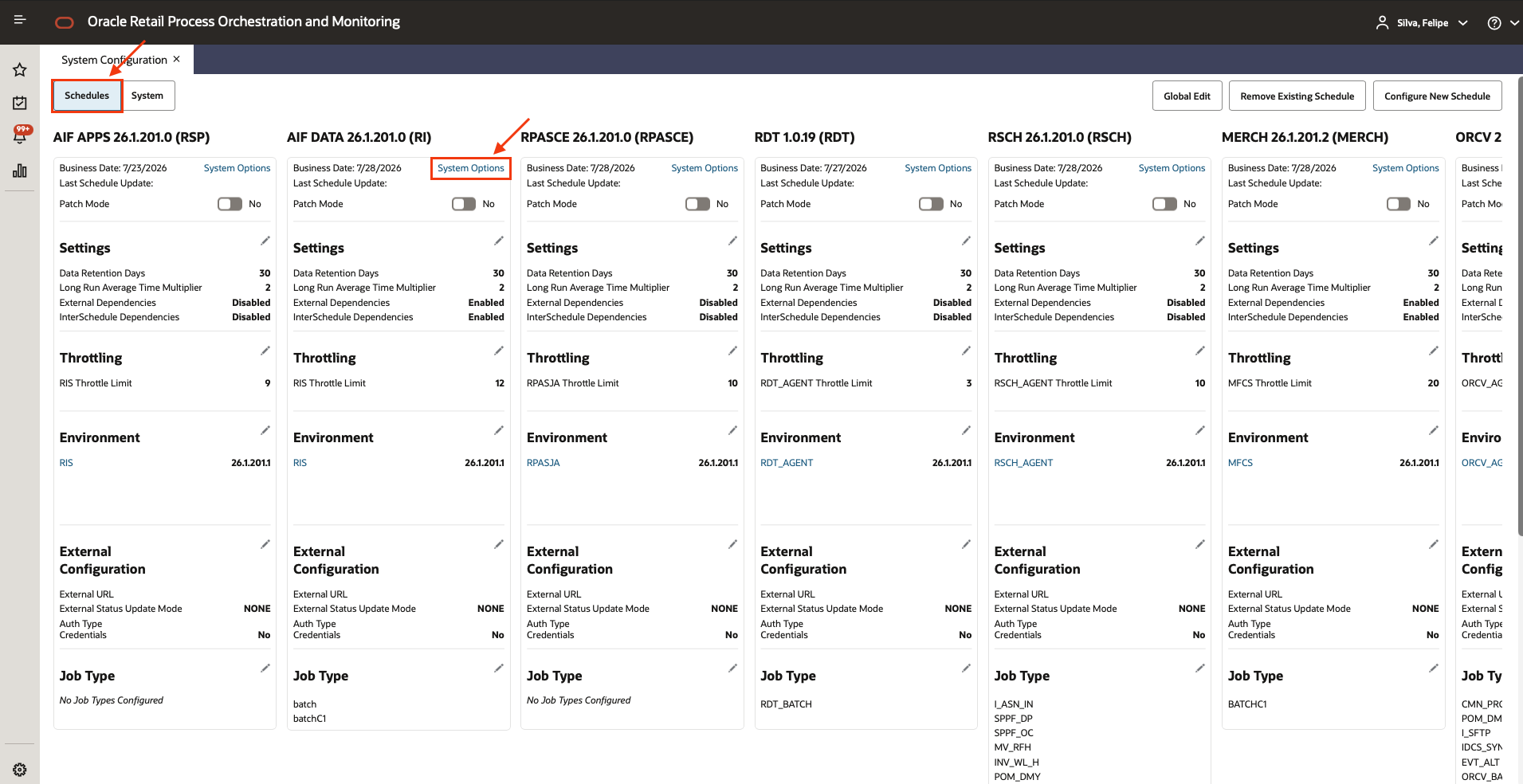
Click on “Schedules”, locate the AIF DATA configurations and click on “System Options”
-
Locate the “keys” called
RDE_RunFactODIVersionandRDE_RunFactVersion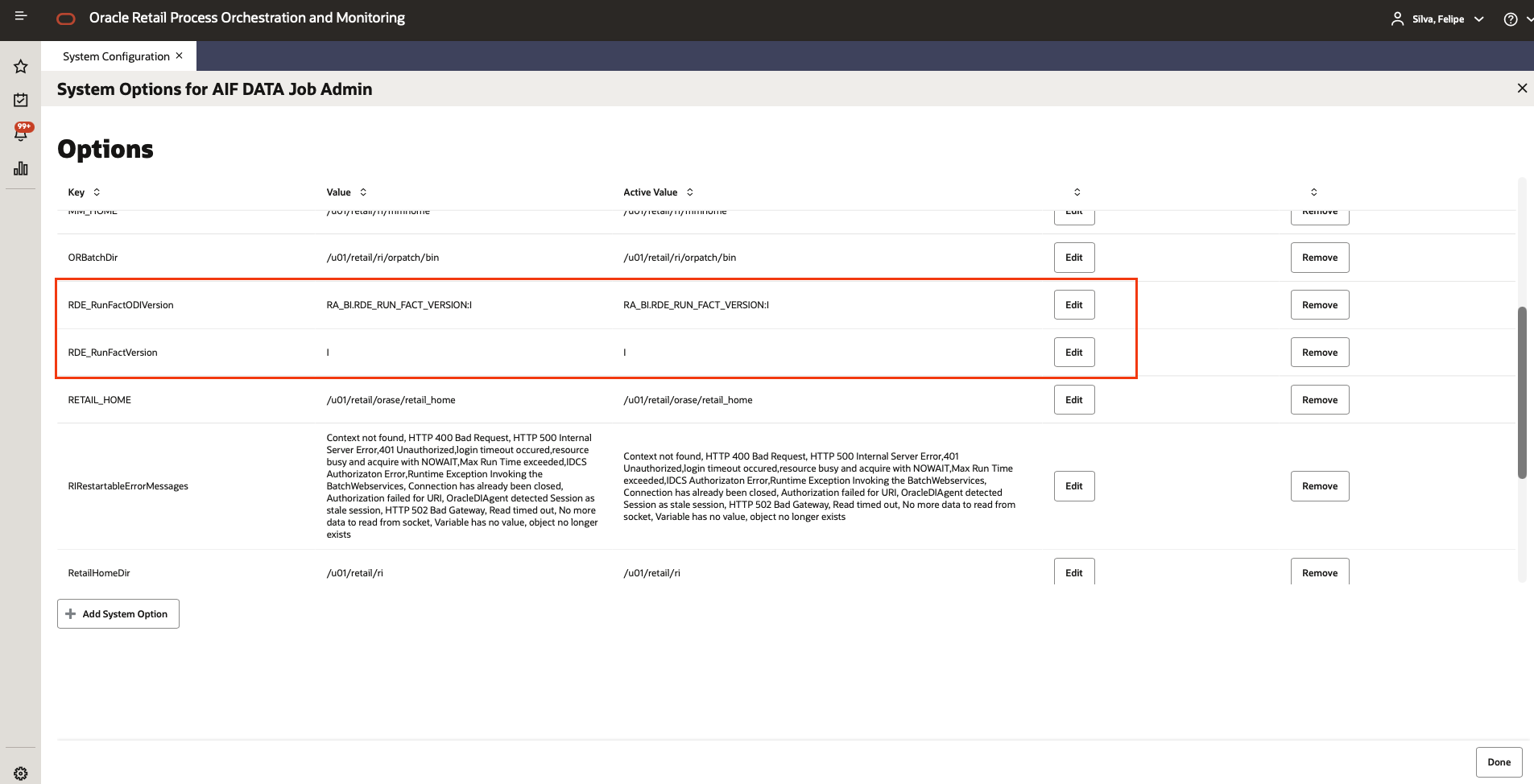
The value to change is the rightmost parameter of the string: I (Incremental) becomes F (Full).
Edit:
RDE_RunFactODIVersion > Active value = RA_BI.RDE_RUN_FACT_VERSION:F
RDE_RunFactVersion > Active value = F
Nightly batch
-
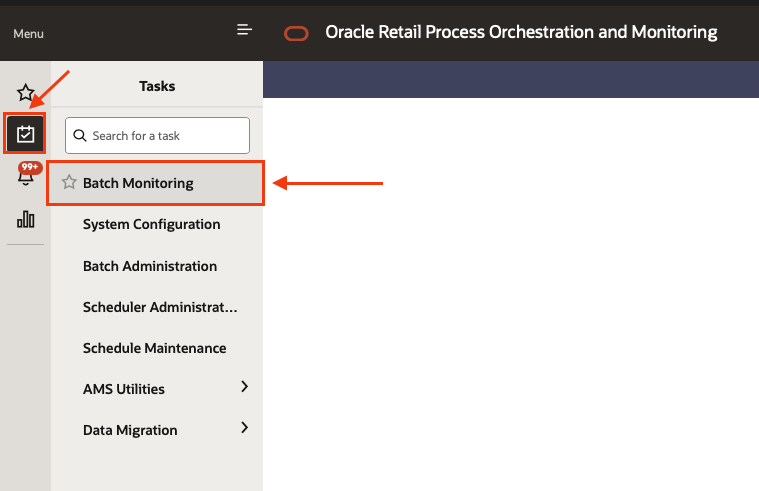
Accessing POM click on the top left menu
-
Select the sub menu “Tasks” and then “Batch monitoring”
-
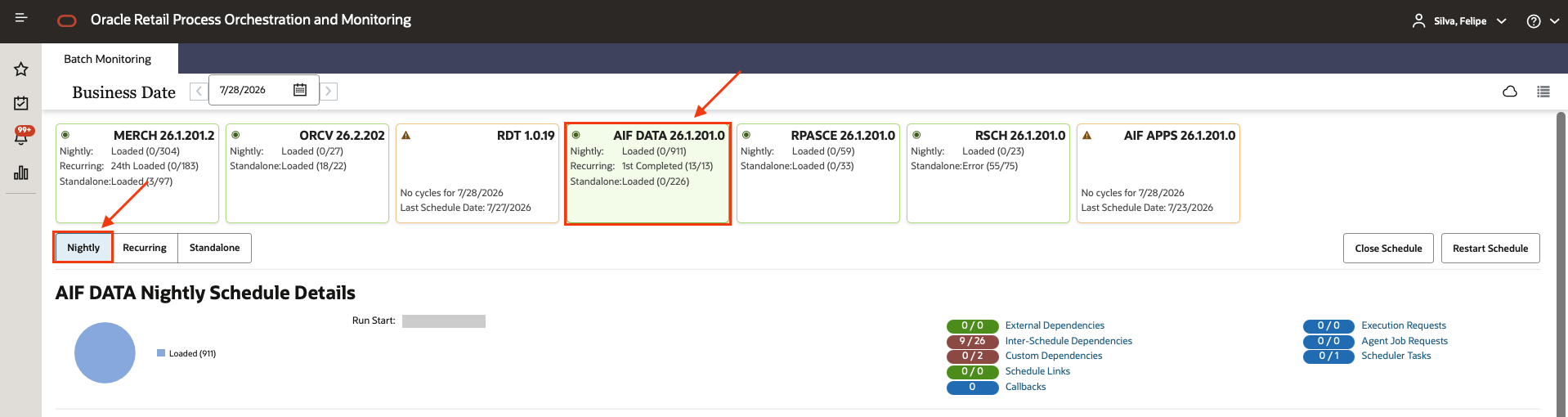
Select the AIF DATA scheduler, and the Nightly chain
-
Using the filters find and select the job
RDE_EXTRACT_END_MILEMARKER_JOBand set a hold on it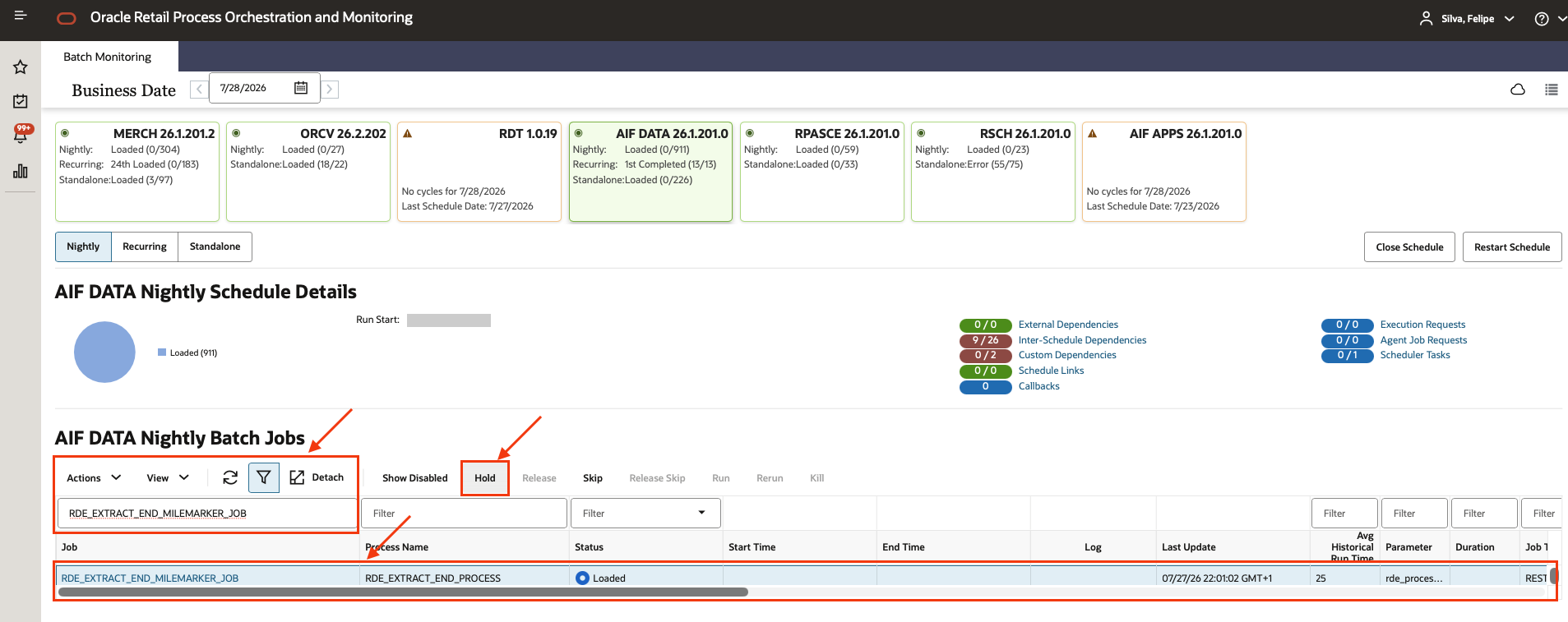
-
When the Nightly batch reaches this point you must perform the validations, in order to confirm all the data has been correctly extracted from MFCS.
For validation samples check MFCS Extraction validations
Related
- Batch setup - Incremental mode: the counterpart procedure, to run afterwards
- MFCS Extraction validations: validation samples
- AIF Initial Setup process